ConvertXtoVideo2.0.0.68
Publisher Description
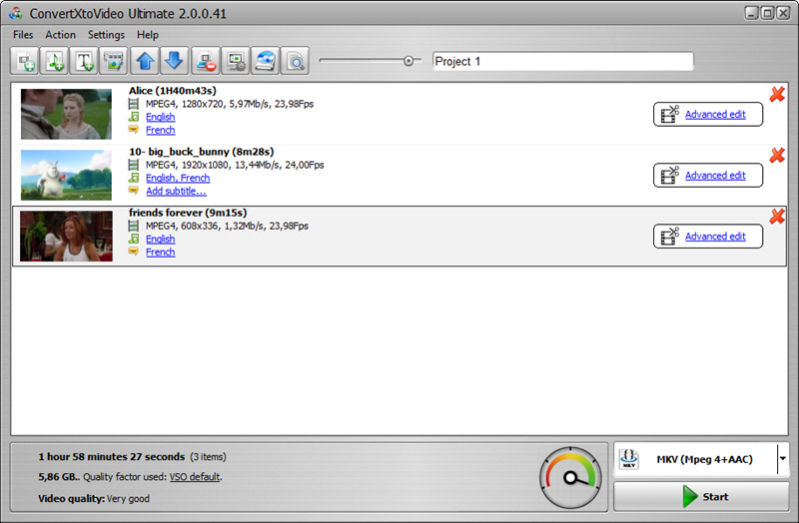
All-in-one video conversion tool. It converts any video into the most popular formats: avi, mkv, DVD, mp4, mpeg, WebM, tablets, smartphones, game consoles, Blu-ray, AVCHD, audio profiles. This universal converter is perfect for the beginners as well as the most advanced users. Default settings allow beginner users to convert their file(s) immediately and get excellent conversion results.
An editing window displays streams as a time line for easy editing. Add additional audio and or subtitle streams. Videos can be cut, merged, cropped, chapter edited as well as image brightness and contrast edited. Advanced users and get their hands on bitrate settings and optimize conversions with hardware optimizations. Use the custom profile editor to create any type of file. A burning engine is included supporting CD, DVD, or Blu-ray disks and various settings. The conversion engine is fast and robust providing excellent results playable on any device!
About ConvertXtoVideo
This Rippers & Converters program is available in English, French, German, Greek, Italian, Japanese, Polish, Portuguese, Russian, Turkish, Vietnamese. It was last updated on 29 September, 2026. ConvertXtoVideo is compatible with the following operating systems: Windows.
The company that develops ConvertXtoVideo is VSO-Software. The latest version released by its developer is 2.0.0.68.
The download we have available for ConvertXtoVideo has a file size of 47.2 MB. Just click the green Download button above to start the downloading process. The program is listed on our website since 2017-05-23 and was downloaded 56 times. We have already checked if the download link is safe, however for your own protection we recommend that you scan the downloaded software with your antivirus. Your antivirus may detect the ConvertXtoVideo as malware if the download link is broken.
How to install ConvertXtoVideo on your Windows device:
- Click on the Download button on our website. This will start the download from the website of the developer.
- Once the ConvertXtoVideo is downloaded click on it to start the setup process (assuming you are on a desktop computer).
- When the installation is finished you should be able to see and run the program.
Program Details
General
System requirements
Download information
Pricing
Version History
version 2.0.0.68
posted on 2017-05-23
Various bugs corrected and improvements made in relation to: project name, menu name, subtitle issues, access violation, hardware optimizations, audio normalization, customization of interface theme (look&feel) and more
version 2.0.0.68
posted on 2017-05-23
Various bugs corrected and improvements made in relation to: project name, menu name, subtitle issues, access violation, hardware optimizations, audio normalization, customization of interface theme (look) and more
version 2.0.0.56
posted on 2017-03-08
Fixes conversion error trying to convert TrueHD to DTS, sometimes subtitles would be black on output fixed, conversion sometimes stops at around 90% during menu encoding fixed and various other corrections and improvements
version 2.0.0.42
posted on 2016-10-26
Added support for 50/60Fps encoding with hardware encoding, allow more than 2 CUDA encoder instances in same time, cut tool improved, error when opening software fixed and many other corrections and improvements.
version 1.6.0.22
posted on 2015-08-21
Compatible with Windows 10, Output size bug corrected related to quality setting, runtime error on startup corrected, and many other minor changes and corrections.
